Author Archives: irwinhkwan

Unknown's avatar

About irwinhkwan

I am a senior user experience researcher with The MathWorks, creators of MATLAB and Simulink. Previously, I worked as a postdoc at the EUSES Lab in Oregon State University. I earned my Ph.D in computer science from the University of Victoria. I have a Software Engineering degree from the University of Ottawa, and a Masters of Mathematics (Computer Science) from the University of Waterloo. I enjoy computer-based music production, hardware synthesizers, and video games.

CHI2013 Paper Accepted: The Whats and Hows of Programmers’ Foraging Diets

In more news from the conference acceptance front, our CHI paper “The Whats and Hows of Programmers’ Foraging Diets” has also been accepted. This paper examines how programmers forage for information while they are debugging and in particular pays specific attention to the types of information they seek. These participants were trying to track down a Java bug in JEdit using Eclipse.

The findings of this paper include the fact that participants used very diverse strategies to pursue the same task, that the participants’ enrichment strategies of searching and breakpoint debugging (that is, modifying the environment by providing information) were very repetitive, and the fact that participants often foraged for information within a single information patch (especially participants who scanned the package explorer and the outline view thoroughly).

I’ll do a more detailed writeup on this paper soon, when the camera-ready version is prepared!

D. Piorkowski, S. D. Fleming, I. Kwan, M. Burnett, C. Scaffidi, R. Bellamy, J. Jordhal. The Whats and Hows of Programmers’ Foraging Diets, to appear in ACM Conference on Human-Computer Interaction (CHI), Paris, France, 2013.

ICSE13 paper accepted: The Role of Domain Knowledge and Hierarchical Control Structures in Socio-Technical Coordination

The official notifications for the International Conference on Software Engineering (2013) have been sent out. ICSE is an archival conference that is one of the top conferences in the field. This year, there was an 18.5% acceptance rate.

The paper is about how the presence of domain knowledge among team members affects how people coordinate in a software team. In addition, many of these teams have other hierarchical structures in place and recommend that certain people limit communications with others to follow team boundaries. We investigated two projects in a large global software organization and contrasted how they structured their teams and thus the resulting communication patterns. Some of the techniques they used to “spread” domain knowledge in the team were by incorporating new hires into the project, rotating roles, and making knowledgeable team members easily reachable.

I’ll give a detailed account of the paper when we get in our camera-ready version (which isn’t due until March)!

D. Damian, R. Helms, I. Kwan, S. Marczak, B. Koelewijn. The Role of Domain Knowledge and Hierarchical Control Structures in Socio-Technical Coordination, to appear in IEEE International Conference on Software Engineering (ICSE), San Francisco, USA, 2013.

The hidden experts in software-engineering communication (NIER track)

This article isn’t a new publication but I thought I’d provide some information about it here. I did this work by analyzing email communication between team members within a large, multinational organization: almost 5000 emails in all, sent all across the organization.

We found that many email discussions involved people who were included in the discussion thread only after the first email was sent! This was surprising because I thought, initially, that if you emailed people about a topic you’d put all of them in the To/CC of the first message. Instead, in this organization, in 57% of the threads someone added a new recipient to the To/CC list as the thread went on.

In addition, I examined the messages and identified four main situations why emergence occurred:

  • Crisis: There was a big crisis situation, and the message was being passed to as many people as possible so that someone, anyone, might have information that will help.
  • Explicit requests: In the discussion, there was a specific request that a person who was not initially included in the message be involved or undergo a task. This is quite common for expertise-seeking; some people would realise that they couldn’t solve a problem and CC a third-party for help.
  • Announcements: Announcements were large-scale announcements of some sort, and had to reach large numbers of people.
  • Following-up: After a particular event, a message would be sent following up on the event. If there were people involved in the event who were not initially invited, they were included on follow-up emails.

There were a number of takeaways that affect my email habits even now – I try to ensure that people are CCed right from the start, and if someone asks me to recommend someone they should talk to, rather than simply telling them that they should speak with Person X, I actually CC Person X as part of my reply.

ACM DL Author-ize serviceThe hidden experts in software-engineering communication (NIER track)

Irwin Kwan, Daniela Damian
ICSE ’11 Proceedings of the 33rd International Conference on Software Engineering, 2011

End-user Debugging Strategies: A Sensemaking Perspective

I recently had an opportunity to work on an interesting paper about how end users apply sensemaking when debugging. In this paper, we analyzed how end users working on real-world spreadsheets identified and fixed errors using a model known as sensemaking.

Sensemaking is a process that people use to learn information from artifacts and to in turn make hypotheses based on the information that they acquired. In sensemaking, people forage for information through interacting with the artifacts (in this case, data and formulas) and then form hypotheses and test them.

One of the main results of this paper is that we come up with a sensemaking model for end-user debuggers. One of the extensions that we proposed is three loops: the “Bug Fixing” sensemaking loop, which is similar to Pirolli and Card’s sensemaking loop, the “Environment” sensemaking loop, and the “Domain” sensemaking loop. Participants usually left the bug fixing loop to head to the environment loop – essentially, they were struggling with Excel, or using some information from Excel to try to move forward with their task.

We also examined in detail how participants moved between different steps while sensemaking. The participants who did well at the task used systematic strategies, and followed up their initial foraging with testing their initial hypotheses. Even though they used two different strategies (selective = depth-first investigation vs. comprehensive = breadth-first investigation), they were both able to do well because they were systematic in their debugging work.

ACM DL Author-ize serviceEnd-user debugging strategies: A sensemaking perspective

Valentina Grigoreanu, Margaret Burnett, Susan Wiedenbeck, Jill Cao, Kyle Rector, Irwin Kwan
ACM Transactions on Computer-Human Interaction (TOCHI), 2012

Tell me more?: the effects of mental model soundness on personalizing an intelligent agent

ACM DL Author-ize serviceTell me more?: the effects of mental model soundness on personalizing an intelligent agent

Todd Kulesza, Simone Stumpf, Margaret Burnett, Irwin Kwan
CHI ’12 Proceedings of the SIGCHI Conference on Human Factors in Computing Systems, 2012

Just yesterday at CHI2012 (ACM Conference on Computer-Human Interaction) in Austin, TX, my colleague Todd Kulesza presented our paper! Unfortunately I couldn’t be there but I’m sure that it went well. This paper was not only accepted at CHI, but it also received an honorable mention, which is absolutely spectacular.

This paper was the second project I helped with over at Oregon State University and is about how inducing a mental model in end users through training can enable them to more efficiently correct the mistakes of an intelligent agent – that is, a machine-learning system that assists users by making recommendations. The experiment that we examined was a music recommendation system. By providing instruction to these end users about the details of how these agents make decisions, the users felt that the cost-benefit ratio of making suggestions was a better use of their time and they had a more positive experience using the system overall.

Check this out, it should be appearing soon in the ACM digital library below. I’ll update it with the ACM Author-ize link when ACM provides one 🙂

Todd Kulesza, Simone Stumpf, Margaret Burnett, and Irwin Kwan. Tell Me More? The Effects of Mental Model Soundness on Personalizing an Intelligent Agent. ACM Conference on Computer-Human Interaction 2012, Austin, USA.

Update: I heard from Dr. Burnett that Todd’s talk was fantastic! I also heard that this paper is on Page 1 of the CHI 2012 proceedings.

Failing at Networking: Configuring an Apple AirPort Express

I travel somewhat frequently and often encounter hotels that provide a cable and no wireless connection. This was a bit of a nuisance when sharing rooms with people, or if I’m interested in trying to check something on my iPad. Internet sharing on the Mac has never seemed to work quite the way I wanted it to. Lately, this problem has been compounded because I have a Macbook Air, but no Ethernet adapter.

Because I’m traveling again this weekend, I decided that I would purchase an Apple AirPort Express. This would be a great way to solve my above problems. First, it’s small enough to carry around with me on a trip. Second, it allows you to share an Internet connection over wireless, which effectively means that I can connect the Ethernet to it and then share the connection to my MacBook Air. An added bonus is that it also had a 3.5mm stereo headphone jack/mini-TOSLink jack that would enable me to plug a set of powered speakers into. Since I just moved, my computer is no longer able to connect to the speakers in the living room since it’s too far away. So really, it seemed like a win all around.

Yet, for some reason, networking equipment and I simply do NOT get along. Back in Waterloo, I was rumoured to have inherited a “curse” about hardware from a fellow graduate student (hello, Ben!) – the curse was that hardware would randomly fail inexplicably in your hands and that you’d spend many hours trying all kinds of configurations to no avail. Thus far, I’ve had a lot of random failures, like my 4-year old PowerMac G5 that one day suddenly failed to power on, a brand new external hard drive, bad RAM in an old computer, mice (lots of mice) and assorted networking equipment. Lots of networking stuff, from cards to wireless routers and stuff. Even now, my 802.11n wireless network seems to not really work well – it has a weak signal and any device seems to have a random chance of not connecting to it.

I’ve wasted a bunch of time today trying to configure the Airport Express. Let me write a post explaining how to not waste time configuring an AirPort Express.

Installing the Correct AirPort Utility

The first kicker is that the most recent version of the AirPort Utility does not have the same functionality as a former version, so if you know a little bit about networking, installing the new version is a bit of a waste – you can’t do things like manage different profiles, which are useful if you want to have a profile for “Playing Music At Home” and “Internet Sharing On The Road”.

However, you still have to install the latest version (6.0 at the time of writing) to get the proper firmware, THEN install the old version (5.6) to get access to the advanced features. Yes, it’s dumb. Apple unfortunately stripped out a lot of features, like profile management, from 6.0.

AirPort Utility 6.0 (for Lion)
AirPort Utility 5.6 (for Lion)

Thus, be sure to install 6.0, update the firmware, then install 5.6.

On Mac OS X, Ethernet takes Priority For Internet Operations

This one’s entirely my fault. When I was testing the AirPort Express by plugging the Ethernet from my cable modem into it, then connecting wirelessly from my desktop, I wasn’t able to get Internet. The problem is that I didn’t ever disconnect the Ethernet cable from my computer. By default, Mac OS X and Firefox tries to get Internet from the Ethernet port and if it can’t get it from there it fails, instead of trying on the wireless network. So if you’re testing this kind of thing, unplug the Ethernet cable from the computer.

Press the Button With a Paperclip to Reset the AirPort Express

Much too often, I got an error when “reading configuration from AirPort Express”. It’s also easy to set it up such that you can’t configure it (like if you try to make it join a wireless network but don’t properly get a DHCP from the Ethernet plug). If you get into a problem like that, stick a paperclip into the bottom of the device and hold it there for about 10 seconds. Unplug it, wait a moment, plug it back in and it should be back to factory defaults.

Once you do that, keep in mind that you need to either be able to plug it into a wired network and get it an IP address, or that you need to remember what wireless network it creates in order to configure it.

AirPlay from iTunes Needs IPV6 Host Mode On

Once I managed to set up a a profile for Internet Sharing that worked fine (using the AirPort Utility 5.6), I wanted to try out AirPlay. I tried using iTunes on my laptop and my desktop, but both gave me an “unknown error (-15006)”. For a company that prides itself on the user experience, it’s a shame that these errors are not actually written in a way such that the user can easily troubleshoot them.

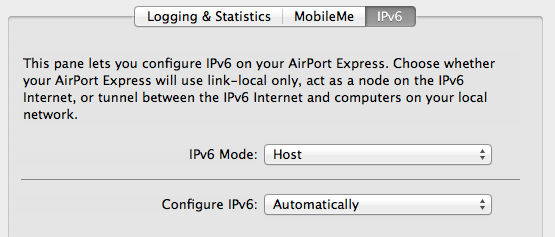
Under the advanced tab -> IPv6, IPv6 Mode should be set to Host.

AirPort Utility IPv6 Setting

It turns out that iTunes on Mac OS X now finds its AirPlay clients through IPv6, but that the AirPort Express doesn’t use IPv6 by default. The solution is to go to the AirPort Utility, go to Advanced, IPv6 and set IPv6 Mode to “Host”. Do this, restart iTunes, and it should work just fine from all of your Apple devices.

Conclusion

I don’t usually fiddle around with products and computer devices anymore, though I used to do this a lot about seven to ten years ago. So it’s fun, yet frustrating, to get a new hardware device to play with. Unfortunately, I have to be kind of in the mood to play around to enjoy it, and usually I don’t like playing with Apple devices, which are supposed to “just work”. Or, maybe I’m just terrible with networking.

Where’d that go? Losing Items on Amtrak Cascades Trains

I’ve had terrible luck lately and have managed to lose items both coming to and going from Bellevue for CSCW (ACM Conference on Computer supported cooperative work). On the way there, I lost the poster tube with the poster that I was presenting. On the way back, I lost a book. Fortunately I managed to find the poster in time but thus far I haven’t been able to locate the book.

One thing that Amtrak does not do is post the phone numbers for its stations on the web. Normally, I don’t tend to do personal posts like this one but I figured that Amtrak Station information for the Pacific Northwest might come in useful to someone some day and therefore have compiled a partial list of phone numbers for the major stations below.

Amtrak Cascades Train Stations in the Pacific NorthWest

Seattle King Street Station Baggage Claim: 206-382-4128
Seattle King Street Station Lost and Found (M-F only): 206-382-4713
Portland Union Station: 503-273-4871
Eugene-Springfield Station: 541-687-0972

Though the Lost-and-Found in Seattle was closed, I did reach the baggage claim about an hour and a half after I disembarked, gave them the train number and time, car number, and seat number, and they were able to retrieve the poster and hold it in the back for me to get it later that evening.

Also, the trains do tend to turn over quickly, and the route numbers change a lot, so try to call soon. In my experience calling though, they’ve been really nice in trying to actually locate your items – while writing this post I even got a call back from the Seattle station asking for details.

Now that said, since these numbers have been posted, you probably shouldn’t try to book tickets or ask general questions of the station. That’s best handled online or through their ticket agent anyway, which is reachable at Amtrak’s web site or through 1-800-872-7245.

To Talk or Not to Talk: Factors that Influence Communication around Changesets

Adrian at the ACM Conference on Computer-Supported Collaborative Work is presenting “To Talk or Not to Talk: Factors that Influence Communication around Changesets”. He went to Zurich to work with the IBM Rational Team Concert team located there, and interviewed them, applied surveys, and did personal observations. He found out that:

  1. Release: Their discussions often were affected by their time within the release cycle. Early on in the cycle, developers were concerned about features, but as time went on, they were more concerned about the software being released, and were much more cautious about the change sets that were being applied.
  2. Perception: The perception around the change set was also important. If the developer was giving off a good impression, then colleagues would monitor them less. Alternatively, if a developer is giving off a poor impression, then their changes may be more heavily scrutinized.
  3. Risk Assessment: The developers were concerned about risk. High-risk change sets heavily encouraged developers to speak with each other. For example, if the change set was large, it was considered higher risk.
  4. Business Goals: The developers were often conscientious about code quality, but were always under pressure to release features and fix bugs. This leads to the phenomenon known as technical debt, where the developers know that the fix is inelegant and ugly, but are often unable to fix it next cycle because management pressure continues to push the developers to release more features.

These considerations may have implications on collaborative recommender tools because they suggest the contexts under which the recommender system may have to adapt itself toward.

Adrian’s posted his slides here so you can take a look!

ACM DL Author-ize serviceTo talk or not to talk: factors that influence communication around changesets

Adrian Schröter, Jorge Aranda, Daniela Damian, Irwin Kwan
CSCW ’12 Proceedings of the ACM 2012 conference on Computer Supported Cooperative Work, 2012

Information Foraging Theory for Collaborative Software Development at FutureCSD

IFT Poster for Future of Collaborative Software Engineering

A poster describing the potential application of Information Foraging Theory to the way people seek information in social collaborative software development settings.

This is a preview of my poster that will be presented at the Future of Collaborative Software Engineering workshop held in conjunction with the Conference on Computer Supported Collaborative Work 2012 in Seattle (Feb. 11-15).

The poster explores how a theory of how people forage for information in their environments might be applied to a social setting where information may be in people’s heads as well as in the artifacts that they work on.

Information foraging theory in general is a theory that postulates that people search for information in a way similar to how foragers in the wild search for food. In an environment, the forager wants to maximize the amount of high-value food for as low a cost as possible. In addition, indicators in the environment, like cues, suggest to the forager where high-yield places may be.

Managing Citations in Word Using Zotero

I am a LaTeX user. However, the unfortunate reality is that Microsoft Word is in very common use and if you’re collaborating with other people, one of your collaborators is going to insist on using Word. The EUSES group at Oregon State University has traditionally used Word on most of their projects.
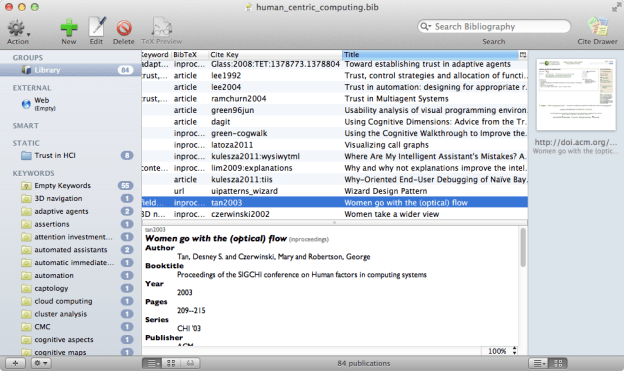
BibDesk Screenshot

BibDesk

One thing that I like about LaTeX is that its citation management is quite good – it’s easy to add references, move them around, and have the Bibliography build properly. Right now, I use BibDesk for much of my reference management. It’s extremely lightweight, stores data in BibTeX format, and is quite portable across systems.

The Need to Keep Files

One of the limitations of BibDesk is that it doesn’t handle files very well. You have to often add them manually to each entry, and it doesn’t keep them organized nicely on the file system. One may wonder – why keep files at all? Can’t you just grab them from the ACM Digital Library when you need them?

Well, yes, but I like files. If I have them, I can work offline. I can use Spotlight (rather than Google) to look for files on my hard drive. I also need files so I can transfer them to my iPad and iPhone. There are also a number of references that simply aren’t on the digital library and have taken a bit of effort to acquire, so I’d rather not lose them.

This led me on a quest to find a slightly better reference management system.

Endnote? Mendeley? Papers?

There’s actually no lack of citation managers out there. Endnote is a relatively long-standing program that is known for providing citation management to Word. Papers is an award-winning paper management program for Mac OS X. Mendeley is a free cross-platform solution that can scan PDF files and automatically fill in a citation with data online.

Collaboration with Mendeley

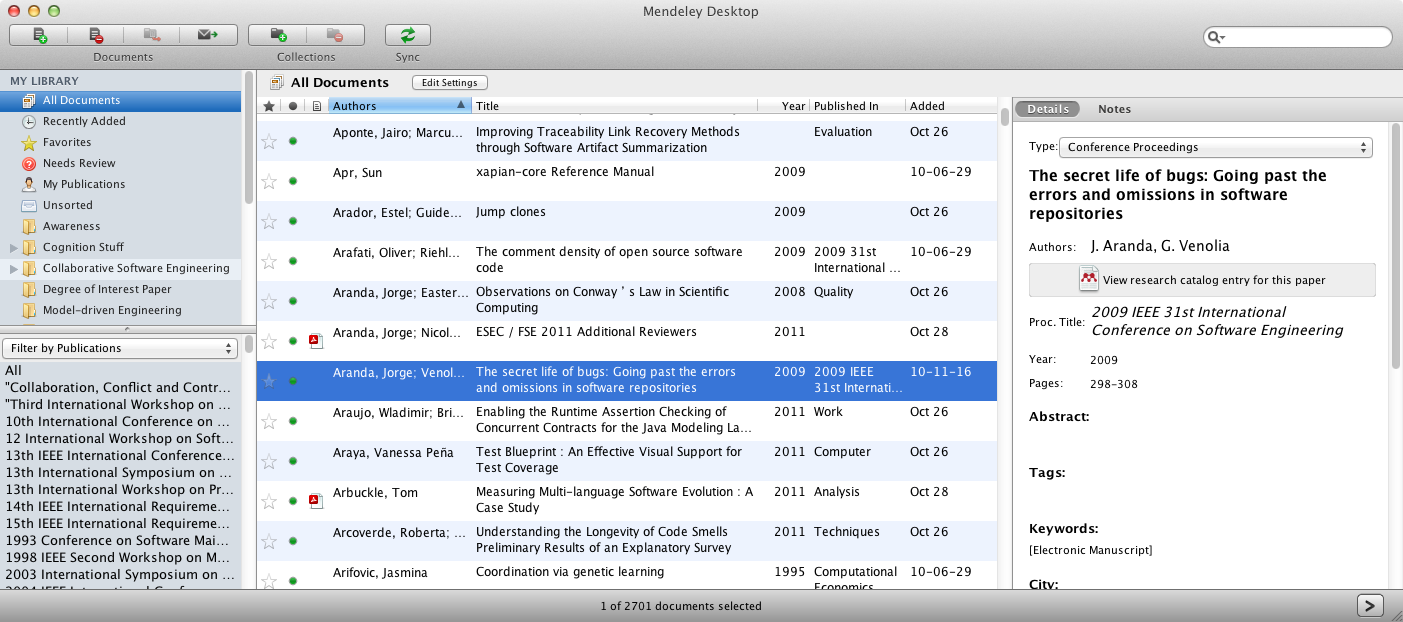
Mendeley Desktop Screenshot

Mendeley Desktop. Notice how OMGHUGE it is.

My choice for about the past year was Mendeley. It is a closed-source program that has an online web presence and a sync server, meaning that once you put your papers into the software, it can display them for you on the web, or sync them onto a new computer. You can also share groups of citations with others – great when you’re surveying literature.

However, the program is big, slow, and uses tons of screen space. I’ve also been experiencing issues with it recently of it not quite finding the right information based on a search of the title. When it was given the paper’s title, it was often filling in the journal with “Society” or something ridiculous like that. It was also not recognizing conference papers as such, often leaving them as the default “Article”.

I began to search for something more robust.

Enter Zotero

I had actually heard of Zotero about the same time I acquired Mendeley (thanks Neil!), but I hadn’t ever bothered to figure it out. Then, I heard that there was a plugin to Microsoft Word that helped you manage references.

What?
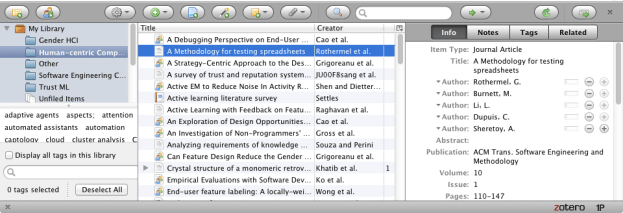
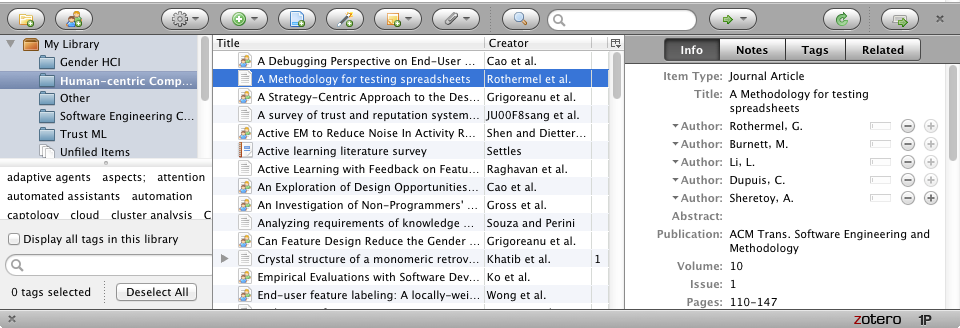
Zotero Panel

Zotero, Firefox Extension

Zotero is a free Firefox add-on. It lives and dies with the web browser, and by default is a little panel at the bottom of your browser window. It, like Mendeley and BibDesk, has the three-panel layout that is “Citation groups”, “Citation list” and “Citation details”.

However, I never really figured out Zotero until I learned about this button that doesn’t exist in the “proper” Zotero panel:

Zotero Add to Library Button

The Zotero Add to Library Button

The “Automatically Capture Bibliographic Information From The Web” button (it doesn’t have a name in the Zotero documentation) appears on pages like ACM Digital Library, IEEE Xplore, and Amazon, where information about references is displayed. When you click this button, it creates an entry for you and populates it with the correct information. Suddenly, I realised that this is a tool that I’ve wanted for a while, because where do I get most of my scientific articles from? I get them from the Web. So, rather than having to copy and paste the BibTex entry into BibDesk (annoying but doable) or downloading the PDF and dragging and dropping it into Mendeley (and then having Mendeley get the information with a 70% chance of it succeeding), I can just skip the process and import it all directly.

Microsoft Word Integration

In addition to being able to import references from the web, Zotero integrates with Word. You need to follow the instructions for installing it which includes downloading Zotero, a Python plugin, and the Word add-on. If you’re using the latest-and-greatest version of Firefox, you might have to also download the Mozilla Add-on Compatibility Reporter to force the Word extension to load (it turns itself off because it’s not certified with the latest version of Firefox, but I force-loaded it and so far don’t have any problems).
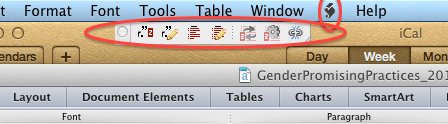
Zotero in Microsoft Word

Zotero in Microsoft Word. There is a toolbar as well as a "Script" menu item in Mac OS X.

When you restart Word, you’ll get a little toolbar as well as a script menu. The script menu contains items that are relatively self-explanatory. You can add citations, add the bibliography, edit the citations and bibliography, refresh the document if you change the database from Zotero, and set your preferences (i.e. your citation format).

One reason why I like this tool is that it’s very lightweight. You can send this version of the document to someone without Zotero, and as long as they don’t try editing all of the fields, they will see the references just fine. This enables you to collaborate with them without having to worry about getting the references out of format (which was something that happened a lot in EndNote X2).

However, Zotero also has cloud-based sync and group-sharing features like Mendeley does, so you can use those features as well to keep your computers in order, and to share citations with your collaborators.

Right now I’m pretty sold on this tool. It is cross-platform (though unfortunately tied to Firefox, but I hear there are Chrome and Safari alphas), syncs documents, imports data automatically, keeps files organized (it saves them in your Mozilla Profile unless you tell it otherwise), and integrates with Word. And, it costs no money. It even imports and exports BibTeX, meaning that I don’t have to give up or even migrate from BibDesk.

If you’re struggling with reference management then I think Zotero is something you might want to try. Happy citing!